Jev in production › Writing and content scoring
DoubaoTypeless
Phone-to-PC text and image input tool, now named Pocket Composer, with an optional off-by-default Jev check that marks likely transcription errors, four reference dimensions and tone in the current draft before the user sends it.
- Use
- Writing and content scoring
- Industry
- Productivity
- Form
- Open-source tool
- Stage
- In production
- Plugs into
- Windows
- Listed
- 2026-09-24
- Found via
- github
- Repository
- aaakoako/DoubaoTypeless
- Stars
- 7
- Forks
- 2
- Last push
- 2026-10-11
- Language
- Python
- License
- MIT
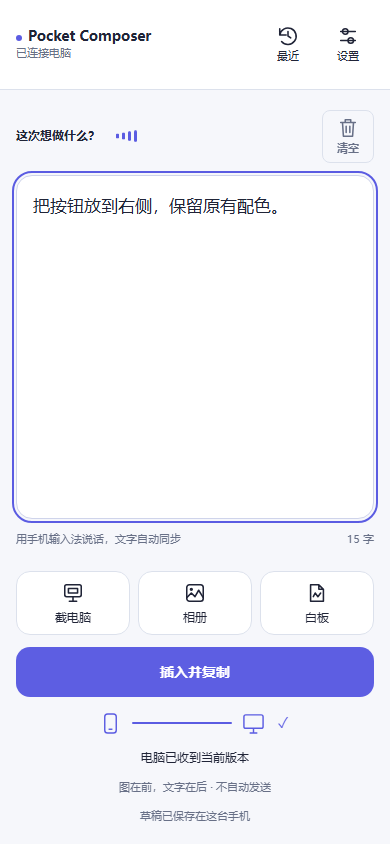
The README opens with
Pocket Composer 手机说清楚,圈出来,画明白。电脑接着做。 手机到电脑的图文输入工具 · Windows 正式版 / macOS、Linux 体验版
向 Agent 描述界面问题、解释代码需求或画一个布局时,手机往往比键盘更顺手。Pocket Composer 把手机输入法、截图标注和白板放在一起,将整理好的图片与文字插入 Windows 上的目标输入框。
你想做什么 用哪个入口 ------ 快速说一段需求 手机输入法语音输入,仍可手动改字 指出屏幕上的问题 截电脑 → 圈画、箭头、编号、图注 带上参考图片 相册 → 编辑、排序、添加说明 表达一个布局或想法 白板 → 手绘、图形、文字 放进电脑输入框 插入并复制 → 逐图后接文字,默认不发送消息 继续下一段或找回上一份 清空/撤销当前稿,恢复最近图文
1. 打开电脑客户端,让手机与电脑接入可互通的可信网络,手机扫码配对。 2. 允许插入并选中目标输入框,例如你正在使用的 Agent 对话框。 3. 手机输入或加图,点“插入并复制”。检查电脑里的内容后,再自行发送。
Badge
For the project's own README, linking back here:

Also used for writing and content scoring
- Jev X Sentiment Analysis ~$0.0008
- Passage (Working Memory Jev) $0.050
- Osso about a tenth of a cent
- riff $0.0004
- Proseward 50x
- dotmap.ai about half a cent
- Postneedle about four thousandths of a cent
- Community Signals (Joshua Poddoku) 77%